Procesos de desarrollo y fabricación de pantallas TFT y LCD monocromáticas de Shenzhen Chenghao
22 octubre, 2025


Buscar ...
Most AGV display failures that come back from the field are not display failures. They are specification failures.
The module was picked off a catalog page — size, resolution, maybe a brightness number — and then the AGV goes into a −25 °C freezer aisle, comes back out into a 28 °C dock, does 400 dock cycles in a shift, and six months later the screen is ghosting, fogging on the inside, or dropping touches whenever the traction motor pulls hard. Nothing on the datasheet was false. The datasheet just never described the job.
An AGV touchscreen is not a smaller version of a fixed HMI panel. It moves, it runs on a battery, it shares a chassis ground with a switching inverter, and it lives through thermal cycles that put water vapour inside your enclosure. Those four facts drive almost every decision below.
What follows is the sequence AGV and AMR builders work through, ordered so the most expensive mistakes are prevented first.
Four questions decide 70 % of the specification. Answer them before anyone talks about inches.
| Entorno operativo | Riesgo dominante | What it forces in the spec |
|---|---|---|
| Indoor warehouse, shielded from daylight | Impact and dust, not light | 300–500 cd/m² is genuinely enough; spend the budget on cover glass and connectors instead |
| Cold chain / freezer aisle | Condensation and cold-start | −30 °C capable module, heater film, breather vent, conformal coating |
| Outdoor yard / loading dock apron | Sunlight washout and heat | 1,000–3,000 cd/m², AG+AR coating, optical bonding, thermal path design |
| Pharma / food cleanroom | Chemical attack and no-fan thermal limits | Glass front, chemically checked AF coating, sealed stack, heat spreader instead of airflow |
Buyers often ask for the largest screen that fits. That is backwards. Size should be set by what the operator has to do while standing next to a machine that may start moving.
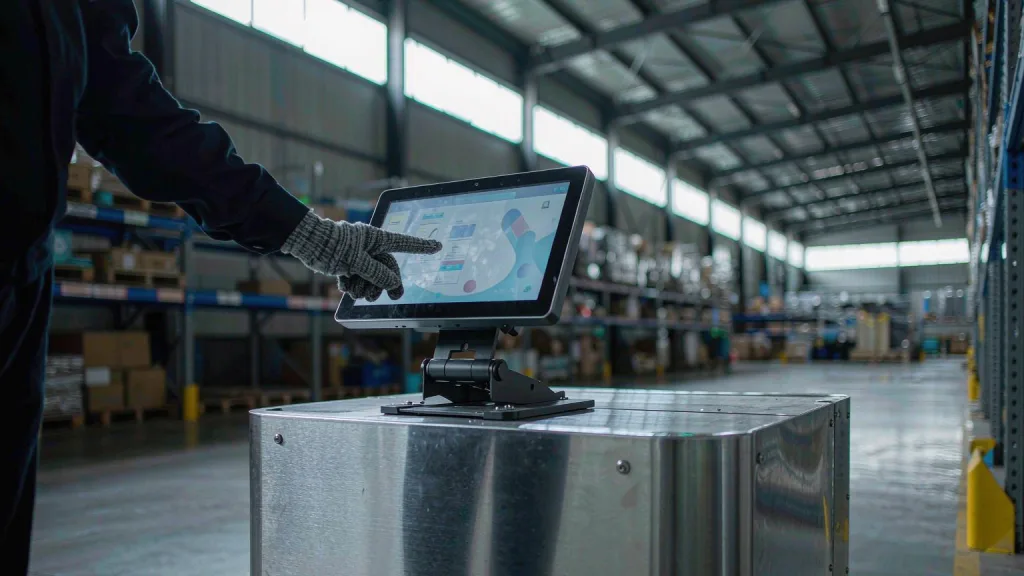
Resolution matters more than people expect once gloves are involved. A gloved fingertip needs roughly a 12 mm minimum touch target. On a 10.1″ 1024×600 panel the dot pitch is about 0.218 mm, so a 12 mm target is only ~55 pixels across — fine, but it leaves no room for cramped icon grids. Drop to 800×480 on the same glass and your UI density budget gets tight fast. If the UI is glove-operated, choose 1024×600 as the floor and design the layout around 12 mm targets from day one.
Real examples in this size range: the CH700WS16A 7″ 1024×600 IPS module (MIPI interface, 164.9 × 100.0 × 3.5 mm, available with an integrated capacitive or resistive touch panel) and the CH101WS07A-CT-PA 10.1″ 1024×600 IPS module with a G+G capacitive panel, 6H surface and I²C touch interface.
Everyone asks for “high brightness” because it sounds safe. On a battery-powered vehicle it is a cost you pay in runtime and heat.
| Situación | Usable brightness | Nota: |
|---|---|---|
| Interior aisle, no daylight, screen shielded by the AGV body | 300–500 cd/m² | Adding nits here buys nothing but heat |
| Near dock doors, skylights, or south-facing glazing | 700–1,000 cd/m² | The transition zone is where read failures happen |
| Outdoor, under canopy or vehicle shadow | 1,000–1,500 cd/m² | Combine with AR coating, not more nits alone |
| Outdoor, direct sun on the glass | 2,500–3,000 cd/m² | Requires a real thermal path; expect 4–6 W of backlight |
Two things beat raising nits, and both are cheaper:
Unión óptica. Laminating the touch sensor and cover glass directly to the LCD removes the internal air gap. That gap is two extra optical interfaces bouncing ambient light back at the operator. Bonding typically improves perceived sunlight contrast substantially without a single extra milliamp — often a better investment than +600 cd/m².
Recubrimientos. AG (anti-glare) scatters reflected light and is usually right for AGVs, because the problem is a diffuse bright warehouse ceiling rather than a single specular hotspot. AR handles the specular case. AF keeps fingerprints and water from smearing — and on a cold-store AGV, it also makes condensation bead and run off instead of sheeting across the viewing area.
Then use an ambient light sensor and actually dim. Night shift at 30 % backlight is not a compromise, it is the correct operating point, and it can halve the display’s average draw over a shift.
Ordering a wide-temperature module is table stakes and, honestly, the easy half. Modules in the −30 °C to +80 °C class are readily available — the CH800XG01A 8″ 1024×768 IPS module runs −30 ~ +80 °C with 3,000 cd/m², for instance.
The AGV-specific problem is the de instrumentos, not the extreme. A cold-chain AGV leaves a −25 °C aisle every twenty minutes. Its front glass is well below the dew point of the ambient air it now drives through. Moisture condenses on the coldest surface available — which is your display, inside your enclosure if the enclosure breathes.
What actually helps, in order of effectiveness:
For a deeper treatment, the site covers protecting modules from moisture and condensation inside industrial housings y el más ancho humidity effects on module reliability.
AGV vibration is not the same load as a machine-tool panel. There are two distinct regimes and they attack different parts.
vibración continua from drive motors and floor joints works on connectors and flex tails. The classic failure is a display that passes incoming inspection, ships, runs for four months, then develops intermittent white screens because the FPC walked out of its ZIF socket by a fraction of a millimetre per million cycles.
Impulsive shock from docking, pallet contact and floor transitions works on the glass stack — cracking cover glass, de-laminating the optical bond, or fatiguing the touch sensor traces.
| Carga | ¿Qué falla primero? | Contramedida |
|---|---|---|
| Continuous motor / floor vibration | FPC in ZIF connector, solder joints, touch tail | Locking connector or a stiffener plus adhesive; never hang the module from its flex |
| Dock impact and collisions | Cover glass, optical bond, bezel gasket | Thicker chemically strengthened glass on exposed faces; 4 mm is available for high-abuse fronts |
| Sustained gasket compression | Seal creep, then water ingress | Hold roughly 25–30 % compression; metal bosses, not plastic standoffs |
One mechanical detail worth more than any datasheet line: mount into metal. Plastic standoffs creep under vibration and heat, the gasket relaxes, and your IP rating quietly disappears in month eight. The site has a full treatment of mounting gaskets and vibration isolation if this is where your design is stuck.
Nobody budgets for this until the prototype runs for five hours instead of eight. The backlight is usually the largest single load in the display subsystem, and it scales roughly with area and with brightness.
As an order of magnitude to design against: a 7″ panel at moderate brightness sits under a watt; a 10.1″ at 400 cd/m² is in the low single watts; the same 10.1″ pushed to 1,000 cd/m² can climb several times higher. Over an eight-hour shift, two extra average watts is roughly 16 Wh — a real number against a vehicle pack, and one that shows up as a shorter route or an extra charging stop.
Practical measures, all cheap:
This does not compress into a paragraph, because it is the decision that generates the most rework. Short version for now:
The full failure-mode breakdown is in the companion piece, Capacitive vs. Resistive Touchscreens for AGV Applications. If your AGV team is arguing about this, read that before you cut a tooling PO.
On a bench, any interface works. Inside an AGV you are routing a display harness past a traction inverter, and that changes the ranking.
| Fácil de usar | Best fit on an AGV | Cuidado con |
|---|---|---|
| MIPI DSI | Short flex inside a sensor head or a display pod driven by a mobile SoC | Poor tolerance of long runs and of cable flexing at the connector |
| LVDS | Display 1 m+ from the compute box; differential signalling resists common-mode noise | More pairs to terminate correctly; shield the bundle |
| RGB paralelo | Legacy controllers, short distances | Many single-ended lines — the worst EMI profile of the four |
| SPI / MCU | Small status panels, low pin count | Bandwidth limits refresh; not for video or map UI |
Three AGV-specific EMC items that get forgotten every time:
For the interface trade-off in more depth, see choosing the right TFT LCD interface: LVDS, MIPI and RGB compared.
AGV fleets are bought by companies that audit their supply chain. Two things matter.
Quality system class. An AGV sits in the same reliability bracket as automotive-adjacent equipment — continuous duty, wide temperature, vibration, safety-relevant. A supplier holding IATF 16949 alongside ISO 9001 / 14001 / 45001 is telling you the process discipline exists, not just the final test. Chenghao holds IATF 16949 with ISO 9001:2015, ISO 14001:2015 and ISO 45001.
Lifecycle commitments, asked in writing. Three questions, and a supplier who cannot answer them in an email is a supply risk:
The touch controller deserves explicit attention. Capacitive controllers from the major vendors get revised, and a firmware-dependent glove tuning can break when the IC changes. Lock the controller part number in your contract, not just the module part number.
And buy spares at the same production lot. Three to five percent of fleet size, held as service stock. A screen replaced two years later from a different glass batch may have a slightly different colour temperature, which looks like a defect to the customer even when it is entirely within spec.
| AGV type | Lógica de especificación | Punto de partida |
|---|---|---|
| Indoor warehouse AMR, task confirm + exception UI, gloved operators | 7″ is enough; 300–500 cd/m²; wide viewing angle for an operator standing to the side; glove-tuned CTP or resistive with motion interlock | CH700WS16A 7″ 1024×600 IPS, MIPI, with integrated touch panel |
| Cold-chain AGV, −25 °C aisle to ambient dock, 10.1″ glass front | Wide temp is mandatory but insufficient; heater film, breather vent, conformal coating, sealed G+G stack that tolerates disinfectant wipe-down | CH101WS07A-CT-PA 10.1″ 1024×600, G+G CTP, 6H, I²C touch |
| Outdoor yard AMR, direct sun, year-round operation | 3,000 cd/m² class, −30 °C start, AR + AG coating, optical bonding, real thermal path; budget the extra wattage | CH800XG01A 8″ 1024×768, 3,000 cd/m², −30 ~ +80 °C |
| Outdoor/industrial AMR needing LVDS over a longer harness | Differential signalling for noise immunity; 8.4″ 4:3 gives more vertical room for fault lists | CH840SV01A-CT 8.4″ 800×600, 1,000 cd/m², 20-pin LVDS, CTP |
Send this and you will skip three rounds of email. A supplier who cannot work with it is telling you something useful.
It depends entirely on the light the screen actually sees, not on the vehicle class. A shielded indoor aisle is comfortable at 300–500 cd/m². Dock doors, skylights and glazed corridors need 700–1,000. Direct sun needs 2,500–3,000 with optical bonding and an anti-reflective coating, and enough thermal design to shed the extra backlight heat.
A wide-temperature module rated to −30 °C can operate there, but the operating range is only half the answer. The harder problem is what happens when the vehicle leaves the freezer and the glass sits below the ambient dew point. Plan a heater film, a pressure-equalising vent and conformal coating on the electronics — and confirm the touch controller is rated for cold start, which is a separate specification from the LCD’s.
Start from the glove. Cut-resistant knit and freezer gloves usually defeat a standard capacitive panel; thin nitrile does not. Then weigh the moving-platform problem: resistive requires firm pressure, which is awkward on a vibrating, braking vehicle. Glove-tuned capacitive resolves both, at the cost of weaker water rejection and tuning tied to a specific glove. The companion article breaks this down failure mode by failure mode.
You cannot eliminate it entirely on a cycling cold-chain vehicle, but you can move it away from the optics: use a breather membrane to equalise pressure without letting water through, conformal-coat the driver PCB and FPC, keep the module off cold metal surfaces, and avoid mounting it where chassis airflow delivers humid air. A heater film also raises the glass above the dew point during the first minutes after leaving the freezer.
Continuous vibration rarely cracks glass. It loosens connections — the classic symptom is an intermittent white screen caused by an FPC creeping out of a ZIF socket over millions of cycles. Impulsive dock shock is the opposite: it cracks cover glass and de-laminates optical bonds. Specify locking connectors, mount into metal bosses, and use thicker chemically strengthened glass on exposed faces.
MIPI if the display is close to a mobile-class SoC. LVDS when the harness runs a metre or more across the vehicle, because differential signalling tolerates the common-mode noise a traction inverter produces. RGB works but has the worst EMI profile. SPI is fine for small status panels only.
Three to five percent of fleet size, purchased at the same production lot as the build. Replacing a screen two years later from a different glass batch can produce a visible colour shift that reads as a defect to your customer, even when the part is fully in specification.
Chenghao Optoelectronic builds TFT LCD display modules from 0.85″ to 13.3″ — IPS, TN, high-brightness and wide-temperature variants, with SPI, RGB, MCU, MIPI and LVDS interfaces and either capacitive or resistive touch integration. Standard modules ship fast, and custom configurations — cover glass, coatings, bonding, heater films, FPC layout — are handled by a team of 125 engineers across three production sites with a combined monthly capacity of 10–13 million pieces.
If you are specifying a display for an AGV or AMR programme, send the operating envelope from section 11 and Chenghao will come back with a configuration and a drawing package rather than a catalog page. Habla con el equipo de ingeniería.o empezar desde el industrial touch display range.